
Connect an AI agent – examples and video guide
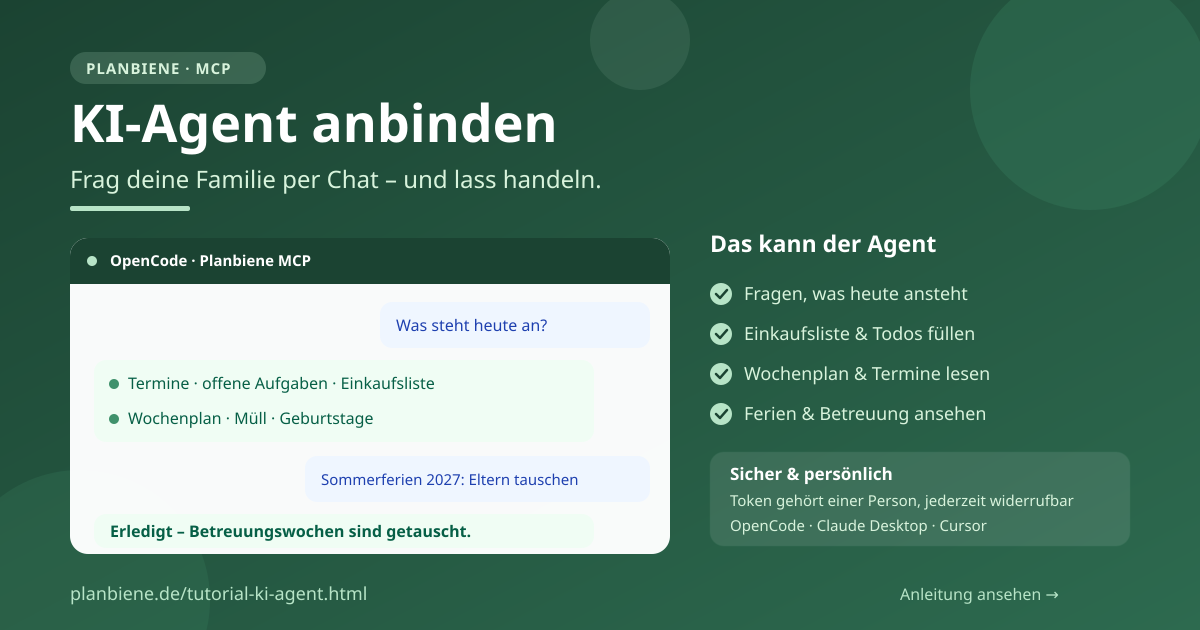
Imagine just saying „What's on today?“ or „Put milk on the shopping list.“ and your family app answers. That's possible: Planbiene can be connected to an AI agent such as OpenCode via the Model Context Protocol (MCP). All you need is a Planbiene account, a personal token and a few minutes.
📅 Appointments: parents' evening 19:00
✅ Open to-dos: take out the rubbish, pay the bill
🛒 Shopping list: milk, bread, eggs (3 items)
🗑️ Rubbish: general waste tomorrow, recycling Friday
🎂 Birthdays: grandma (in 4 days, 72)
📆 Holidays: none entered for today
This is what the conversation looks like: Planbiene answers in chat without opening the app
Step 1 – create a token in the app
- Open Planbiene and go to Settings → 🤖 AI assistant.
- Enter a label (e.g. „OpenCode on my laptop“) and click Create token.
- Copy the token straight away – it is shown only once (format
pb_mcp_…).
The token belongs to you personally and carries exactly your permissions. Sharing it means sharing your own access – not the family's. More details in the handbook: AI assistant (MCP).
Step 2 – configure OpenCode
Add this to ~/.config/opencode/opencode.json (or opencode.jsonc):
{
  "mcp": {
    "servers": {
      "planbiene": {
        "type": "remote",
        "url": "https://app.planbiene.de/mcp.php",
        "oauth": false,
        "headers": {
          "Authorization": "Bearer {env:PLANBIENE_MCP_TOKEN}"
        }
      }
    }
  }
}
And set the environment variable (permanently in ~/.bashrc or ~/.zshrc):
export PLANBIENE_MCP_TOKEN='pb_mcp_…'
oauth: false matters – Planbiene does not offer an OAuth flow for standard
MCP clients. Restart your shell after setting the variable.
Step 3 – check the connection
opencode mcp list
Expected: planbiene connected. Then you're ready to go.
Examples for everyday life
The agent understands ordinary sentences. These questions and requests work straight away with the MCP token:
- „What's on today?“ – appointments, open to-dos, shopping list, rubbish, birthdays, holidays and the weekly plan for the day.
- „Put 500 grams of flour on the list.“ – amount and unit are carried over.
- „Which to-dos are still open?“ – including due dates and points.
- „Create a to-do ‚take out the rubbish‘ for tomorrow.“ – goes into the family list.
- „What are we cooking this week?“ – the weekly plan with recipes and portions.
- „What appointments do we have in the next 7 days?“ – the family calendar for that period.
The assistant fetches the answers from Planbiene when needed and phrases them in ordinary language. Notes about missing permissions or demo limits come back as normal answers – not as a crash.
Real-life example: summer holidays 2027
A case that actually came up for us recently: for the summer holidays 2027 the parents responsible for care should be swapped. An agent with access to the installation can carry out a request like this:
Example answer from an agent with installation access – not possible with the standard MCP token
Video guide
The recording will be embedded here. Until then, the full storyboard with every click and piece of text is below – you can follow the steps right now.
Recording storyboard
- Intro: „We're connecting Planbiene to an AI agent. At the end the agent simply tells us what's on today.“
- Create the token: Settings → 🤖 AI assistant → label „OpenCode on my laptop“ → create token → copy it immediately and put it in an environment variable.
-
Configuration: open
~/.config/opencode/opencode.json, paste themcp.servers.planbieneblock, point outoauth: falseand set thePLANBIENE_MCP_TOKENvariable. -
Check the connection: type
opencode mcp listand highlightplanbiene connected. - First questions: ask „What's on today?“, then „Put milk on the shopping list.“ – briefly show the answer and the filled list in the app.
- Everyday examples: ask about open to-dos, the weekly plan and appointments for the next seven days one after another.
- Holiday example: show the prompt for swapping the parents in the summer holidays 2027 and immediately add the note that an agent with installation access is required.
- Security: keep the token secret, revoke and recreate it if lost; child tokens cannot see parent modules.
Good to know
- The token belongs to one person – child tokens cannot see parent modules such as the household budget or receipts.
- In inactive families, reading stays allowed while writing is refused.
- A revoked token loses validity immediately on the next request.
- MCP and Alexa use the same underlying logic – entries end up in the same list.
All tools, permissions and error messages are in the handbook: AI assistant (MCP). For the shortest introduction, see also the tutorial: connect an AI assistant (MCP).