
🔄 Custody planner
The custody planner helps parents living apart make the handovers in a shared custody arrangement predictable: a recurring base pattern, individual swap days when needed and a log of every change.
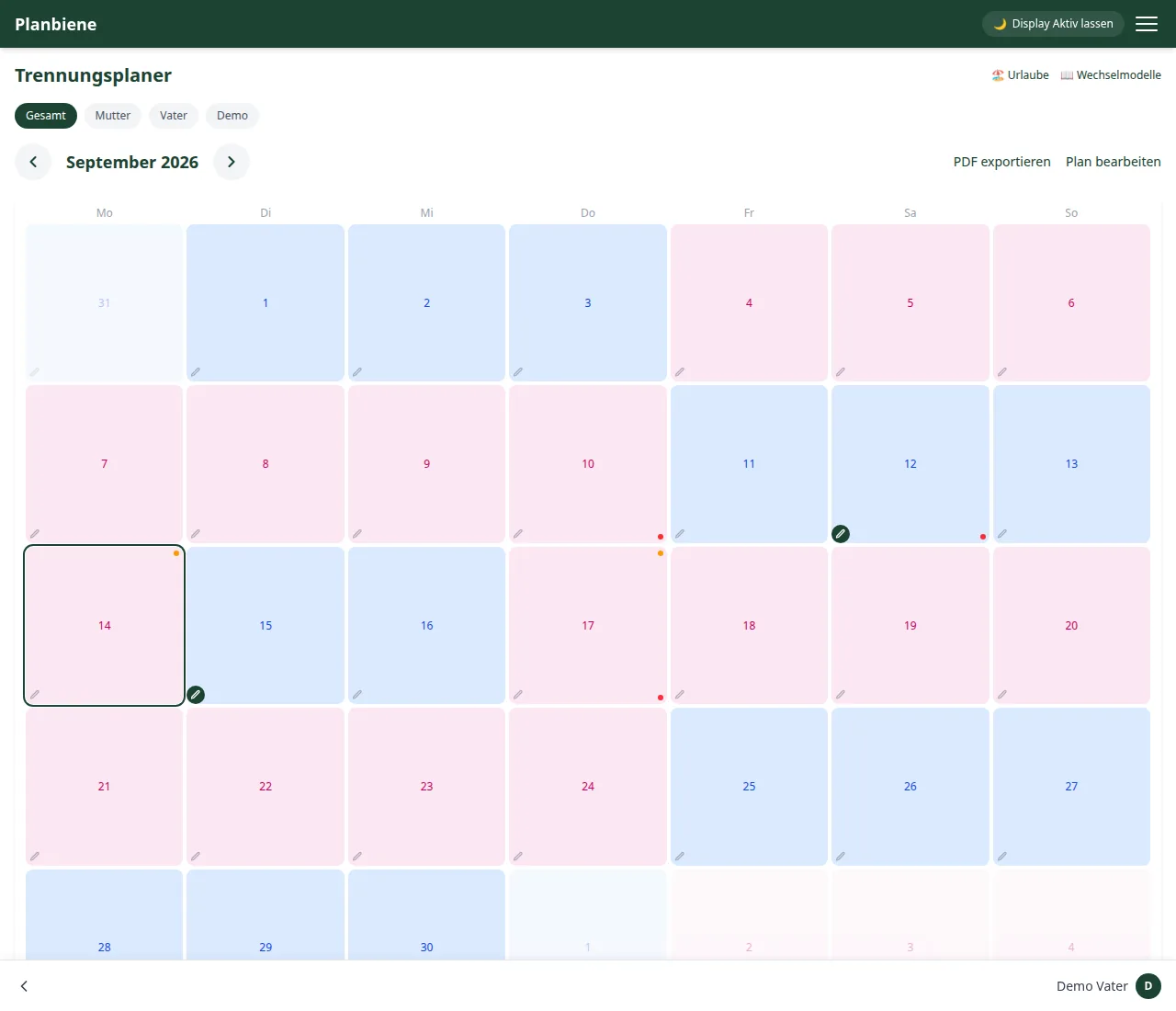
Setting up the base plan
- Open the Custody planner entry in the menu.
- Click Edit plan.
- Choose a start date and which parent begins on that day.
From the start date the app automatically calculates whose turn it is on which day according to the pattern, and shows it in colour in the calendar (blue/pink in the legend below the calendar).
Swapping a day
Tap a day in the calendar to assign it to the other parent. Swapped days are marked with a small dot and therefore visibly depart from the base pattern. Every swap automatically ends up in the change log below the calendar – including who made the change.
Notes per day
Using the pencil icon on a day you can add notes such as medical appointments or handover reminders. Notes accumulate chat-style on a day – several entries per day are possible and older ones are kept.
Creating events in the family calendar
If your family has set up a calendar, the day dialog shows its events – and you can add new ones there too: tap a day and then + Create event, choose the calendar, enter a title and specify whether the event is all-day or takes place at a particular time (including duration). All-day events can span several days, e.g. for the school holidays.
The event is written straight into the calendar and belongs to that calendar afterwards – so it also appears in every other program that has subscribed to it (phone calendar, Outlook, Google …). The other family members get a notification about it.
Keeping events in view
The events from the saved calendars don't only appear in the day dialog: on the home page the "Today & tomorrow" tile shows what is coming up next – with the time and the calendar the event came from. If nothing is due, the tile stays away.
What's more, the app sends a push reminder: two hours before events with a time, and on the evening before for all-day events – whoever has to pack for the school trip in the morning would rather know the evening before. Multi-day events announce themselves only once, on the first day. You can switch this off like any other notification under Settings in Event reminders.
Counting days
Below the calendar the app shows how many days have lain with the father or with the mother respectively since the start date – handy for a quick overview without having to count yourself.
Sharing the monthly view via a share link
Grandparents, babysitters or the school often only need a glimpse of the calendar – without app access of their own. For that there is a public share link: a read-only view of the monthly overview, optionally filtered by individual child, entirely without a login.
- Scroll down in the custody planner to the 🔗 Share link card.
- Click Create link and copy the generated link.
- Share the link, e.g. by messenger or email, with the person you want.
Whoever opens the link sees the same calendar with the child tabs for choosing, can switch between months and recognises swapped days by the small dot – but cannot change anything, comment or otherwise see anything from your family. Notes and calendar events deliberately stay private and are not shown via the link.
Holidays
Under the Holidays tab you coordinate holidays with the children. A holiday assigns a period to one parent – the custody days are then firmly assigned in the calendar and depart from the regular rotation. A page of its own explains the holiday planner in detail.
Public holidays and school vacations
If a federal state is saved in the family settings, the calendar shows public holidays and school vacations in colour. That way you see at once when the holidays are and which public holidays stand in the way of your planning. The synchronisation happens automatically.
Shared custody models
The Shared custody models page (in the menu under Custody planner) presents seven common custody arrangements with pros and cons: weekly model, 2-2-3, 2-2-5-5, 3-4-4-3, nest model, residence model and exclusive 50/50. Each model shows a live preview as a 14-day grid. A page of its own explains the shared custody models in detail.